JMX Remote Guide
In JMX Guide we’ve covered everything related to local usage of JMX technology. That’s all that was part of the original JSR 3: Java™ Management Extensions specification.
The remote aspect were initially covered by a separate JSR 160: Java™ Management Extensions (JMX) Remote API specification which was eventually included in JSR 3 itself.
This chapter covers part III JMX Remote API Specification of the JSR 3: Java™ Management Extensions specification and builds on the concepts introduced in JMX Guide.
We already know that:
-
javax.management.MBeanServerConnectioninterface may represent a remote connection to an MBean server / JMX registry -
java.lang.reflect.Proxyandjava.lang.reflect.InvocationHandlercan be used to obtain a proxy wrapped inside a plain Java interface
JMX Remote may simply be understood as an implementation of javax.management.MBeanServerConnection that connects to a remote MBeanServer underneath. This chapter covers all necessary details expanding on the topics covered in JMX Guide.
JMX Connectors and Protocol Adaptors concepts
In the chapter II JMX Agent Specification, there’s a short 5.3. part about connectors and protocol adaptors. From the perspective of local MBeanServer, these are two hints about how to allow a remote access to MBeans registered in MBeanServer.
- Connectors
-
Quoting the specification:
A connector is specific to a given protocol, but the management application can use any connector indifferently because they have the same remote interface.
In other words a connector allows remote applications to use the same interface (namely:
javax.management.MBeanServerConnection) to access remote MBeans exactly as the local MBeans. - Protocol Adaptors
-
Quoting the specification again:
Management solutions […] access the JMX agent not through a remote representation of the MBean server, but through operations that are mapped to those of the MBean server.
With protocol adaptors we use a protocol that not necessarily map 1:1 with the API defined by
javax.management.MBeanServerConnection. JMX Specification brings an example of SNMP, but any other protocol may be used.
Jolokia may be perceived as JMX Protocol Adaptor that maps HTTP protocol and JSON messages into MBeanServer[Connection] operations. That’s the key goal of Jolokia.
But with org.jolokia:jolokia-client-jmx-adapter Jolokia also provides a javax.management.remote.JMXConnector implementation which makes it an actual JMX Connector as well.
JMX Connectors - an overview
Here’s a diagram depicting a JMX Connector:
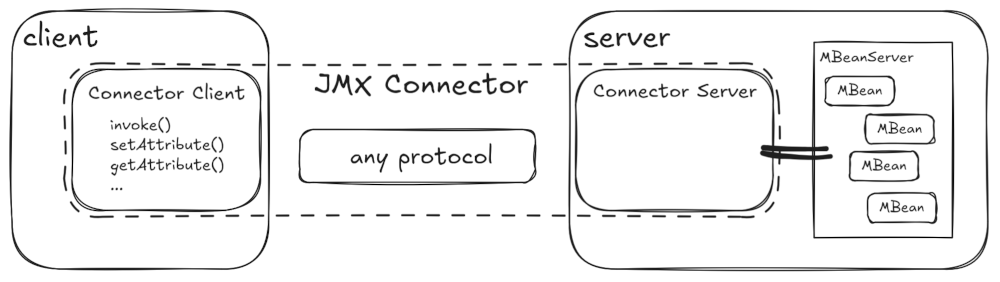
The MBeanServer component is a local MbeanServer with registered MBeans. The one we access within the same JVM using java.lang.management.ManagementFactory.getPlatformMBeanServer(). To make the MBeans available remotely using a JMX Connector we need two things:
-
A Connector Server - a component attached to a local MBeanServer which enables remote access (for example by listening on a TCP Server Socket)
-
A Connector Client - a component running in different JVM available under a
javax.management.MBeanServerConnectioninterface, which translates Java calls into remote invocations - for example messages sent over a TCP connection.
As we already know, it’s best to implement the javax.management.MBeanServerConnection interface as java.lang.reflect.Proxy, which (in the related java.lang.reflect.InvocationHandler) performs the remote call.
However JMX defines special interfaces for both the client and server counterparts. These are respectively:
-
javax.management.remote.JMXConnector- it’s main task is to let users obtain ajavax.management.MBeanServerConnectionreference -
javax.management.remote.JMXConnectorServer- it’s constructed with an attached local MBeanServer and in general starts accepting remote connections which are forwarded to the attached local MBeanServer.
To make things more enterprisey, JMX provides factories that delegate to providers which are eventually used to create the above components (respectively):
-
javax.management.remote.JMXConnectorFactory- creates connector clients usingjavax.management.remote.JMXConnectorProvider -
javax.management.remote.JMXConnectorServerFactory- creates connector servers usingjavax.management.remote.JMXConnectorServerProvider
Jolokia provides an implementation for javax.management.remote.JMXConnector and javax.management.remote.JMXConnectorProvider, but not for javax.management.remote.JMXConnectorServer and javax.management.remote.JMXConnectorServerProvider.
|
Obtaining a connector (client)
As mentioned in JMX Guide, Java is well know for the delegation of responsibility - providers, factories, dependency injection and service locator are the patterns used to obtain references to other components/objects/services.
Here’s a list of the steps to take starting from what we need to how do we get it. There’s nothing protocol/transport specific (yet).
-
We need a reference to the
javax.management.MBeanServerConnectionwhich we can use to access remote MBeans. -
We can get such reference using
javax.management.remote.JMXConnector.getMBeanServerConnection()method, so we need a JMX Connector (Client). -
We can get a JMX Connector (Client) using
javax.management.remote.JMXConnectorFactory.newJMXConnector(), so we need a JMX Connector (Client) Factory. -
javax.management.remote.JMXConnectorFactorycontains static methods, so we don’t have to get it, we just need to be able to call relevant methods. -
There’s one method called
newJMXConnector(JMXServiceURL serviceURL, Map<String,?> environment)(theconnect()methods use this one and calljavax.management.remote.JMXConnector.connect()on the created connector) -
That’s why we need a
javax.management.remote.JMXServiceURL- and we have to create it.
Reversing the checklist, we need to start with a javax.management.remote.JMXServiceURL - we can call it a starting point.
Chapter 13.8 "Connector Server Addresses" of the JMX specification defines what the JMX Service URL is. The definition of the URL is simple:
service:jmx:<protocol-specific-part>
It’s the <protocol-specific-part> that may be more complex. And we’ll discuss the details in the respective sections for particular protocols.
| This URL format is defined in RFC 2609, section 2.1. Service URL Syntax |
This URL suggest we know some address which may be an IP address + TCP port, but doesn’t have to be. Everything depends on the actual protocol being used.
There’s another way to get a client connector - by obtaining an object called a stub.
Such object encapsulates the state and behavior that can be used in one place (the client) to manipulate a remote service/object just as if it was available locally. This concept is related to distribute programming and is present in technologies such as Corba or RMI.
In such systems, remote objects (services) are accessed through stubs and the stubs are initially located in technology-specific way.
We will provide more information in sections about RMI.
JMX Connectors defined in the specification
JMX Remote specification defines connectors based on two protocols:
-
mandatory RMI using Java Object serialization
-
optional JMX Messaging Protocol (JMXMP) based directly on TCP sockets. This connector is specified in Chapter 15 "Generic Connector" of the JMX Specification and in theory allows for pluggable implementation of handshakes, messages and profiles and generally the entire protocol.
But it is optional and not available in standard JDK distribution, so we won’t discuss it any further.
So we’re left with one mandatory protocol implemented by RMI Connector (Chapter 14 of the JMX Specification). It’s fully covered in the following sections, but here let’s clarify one thing.
RMI technology defines two transports:
-
default JRMP transport using
java.rmi.*package. It’s full name isRMI/JRMP -
deprecated IIOP transport defined by Corba using
javax.rmi.*andorg.omg.*packages. It’s full name isRMI/IIOP. Corba packages and classes are no longer available and were removed with JEP 320 in JDK 11.
It’s worth to mention thatjavax.management.remote.rmi.RMIIIOPServerImplis deprecated and itsexport()method throws anUnsupportedOperationException("Method not supported. JMX RMI-IIOP is deprecated")exception.
It is simple then - we have one JMX Connector based on RMI and we have one RMI transport to choose (JRMP).
JMX Connector implementation based on RMI technology is the default and only mandatory implementation in JMX Remote specification.
I didn’t really feel like the information on RMI itself should be part of Jolokia Reference documentation.
But I wanted to, so the picture is complete. Also, showing the configuration of RMI Connector for JMX may help to understand the decisions made when implementing Jolokia.
Let’s start by showing what the RMI actually is (without references to JMX Remote).
Remote Method Invocation
| I’ll try to be concise, but I can’t promise anything because this is a very interesting subject. |
RMI technology dates back to the origins of Java language, when distributed object systems were considered as serious enterprise platforms. Back then the approach was to build complex systems in Object-Oriented fashion. Every component was treated as an object whether it was available locally in a single memory space (a process of an Operating System) or exposed remotely using various protocols.
It’s enough to mention:
Remote Objects were eventually shadowed by Service Oriented Architectures andy especially by Web Services based on HTTP protocol. But that’s a completely different story.
Assuming that everything is an object, RMI specifies clearly that a remote object is an object of a class that implements a Java interface, which:
-
extends
java.rmi.Remoteinterface (which is a marker interface) -
specifies methods that:
-
declare to throw
java.rmi.RemoteException -
accept parameters and return values that are either other remote objects or implement
java.io.Serializableinterface
-
Creating and exporting the remote objects
A remote object can be invoked remotely. RMI uses TCP protocol and Java Serialization mechanism, so it’s clear that there’s a need for a TCP listener and java.io.ObjectInputStream/java.io.ObjectOutputStream.
The act of making a Java object which matches the remote object contract (presented earlier) ready to be invoked remotely is called exporting.
Here’s an example:
public interface Hello extends Remote { (1)
    String sayHello() throws RemoteException; (2)
}

public static class HelloServer implements Hello { (3)
    private final String name;

    public HelloServer(String name) {
        this.name = name;
    }

    @Override
    public String sayHello() {
        return "Hello " + name + "!";
    }
}

public static void main() {
    int tcpPort = 2000;
    Hello remote = (Hello) UnicastRemoteObject.exportObject(new HelloServer("name 1"), tcpPort); (4) (5)
    System.out.println(remote.sayHello()); (6)
}| 1 | We define an interface that extends java.rmi.Remote |
| 2 | sayHello() method is declared to throw a java.rmi.RemoteException |
| 3 | We implement the interface using plain Java |
| 4 | java.rmi.server.UnicastRemoteObject is an entry point for exporting objects to be available/reachable remotely. Unicast (probably) means there’s a single object being exposed. We specify a TCP port at which the exported object will be available. More objects can be exported using the same port and RMI implementation in JDK will correctly dispatch a remote call to proper object. |
| 5 | The return value from the exportObject() method is a stub we mentioned earlier. This stub allows us to access the remote object as if it was available locally. |
| 6 | We call the remote method as if it was available locally. |
Back in the old days, a lot of boilerplate code was generated from IDL definitions. The generated artifacts included client stubs and server skeletons. These were actual objects (or other code in languages like C) that handled the complexity of remote invocations.
Dynamic stubs do not require pre-generated code and simply handle the remote invocations dynamically.
The stub returned from java.rmi.server.UnicastRemoteObject.exportObject() is obviously a java.lang.reflect.Proxy with an invocation handler being java.rmi.server.RemoteObjectInvocationHandler. There’s a lot of beautiful code involved and I can’t resist giving a taste of it:
-
exportObject()first handles the server side:-
java.rmi.server.ServerRefrepresents the remote side of the remote object and effectively contains a mapping of numbers to particularjava.lang.reflect.Method -
such server reference consists of two things - unique
java.rmi.server.ObjID(count, time, unique, hash) and asun.rmi.transport.tcp.TCPEndpoint(host, tcp port) - both wrapped in asun.rmi.transport.LiveRefobject -
sun.rmi.transport.LiveRefobject which represents a live (as opposed to passive, but able to activate_) remote object
-
-
for the client part:
-
the same
LiveRefis stored in ajava.rmi.server.RemoteRefobject -
the dynamic stub - a
java.rmi.server.RemoteObjectInvocationHandleris created with this client ref
-
-
both the exported implementation and the created dynamic stub:
-
are wrapped inside
sun.rmi.transport.Targetobject -
cause a
java.net.ServerSocketto start accepting TCP connections (if not yet accepting for a given TCP port). Incoming TCP connections are handled in a thread namedTCP Accept-<port> -
are stored by
sun.rmi.transport.ObjectTable.putTarget() -
are used to compute a mapping between numbers and Java methods using
sun.rmi.server.Util.computeMethodHash(). This method translates ajava.lang.reflect.Methodinto alongvalue which is the first 8 bytes of an SHA digest of method descriptor.
-
Accessing the remote objects
In the previous example we’ve obtained the dynamic stub (a java.lang.reflect.Proxy) by exporting the remote object. This means that we’re actually working in the same JVM. However calling the proxy will already lead to a remote method invocation.
Here’s what’s happening when we call remote.sayHello():
-
java.rmi.server.RemoteObjectInvocationHandlerof our proxy (the dynamic stub) delegates tojava.rmi.server.RemoteRef.invoke() -
this
RemoteRefis the reference created during the export and holds asun.rmi.transport.LiveRefmatching the one stored in the table of exported remote objects -
we need a
longvalue representing the remote method - again it’s calculated dynamically usingsun.rmi.server.Util.computeMethodHash() -
ObjectOutputStreamis wrapping the TCP Socket’s output stream and the live ref and everything needed to identify the remote at the server side is marshaled as data objects (includingjava.rmi.server.ObjID, the method’s hash andsun.rmi.transport.TransportConstants.Callmarked indicating a remote call) -
method arguments are also marshaled to the same output stream
-
sun.rmi.transport.StreamRemoteCall.executeCall()flushes the stream and prepares it for reading the response -
ObjectInputStreamwrapping the TCP Socket’s input stream is used to retrieve the return value of the remote method
TCP connection is involved, but let’s not dig into the details of additional configuration (like SSL) - we’ll discuss these in JMX Remote RMI Connector - the details.
Obtaining the dynamic stubs - the RMI Registry
In previous section we’ve shown how the remote object is exported and its dynamic stub (a proxy) is created. We used the proxy to perform a remote invocation. This was easy, because we got the proxy from the exportObject() method in the same JVM.
Normally the return value from the exportObject() call has to be stored somewhere and made available for actual remote clients to use. Ideally, we need something short and enough to represent a remote object.
As mentioned in Accessing the remote objects, parameters passed to remote methods are subject to Java Serialization. But it’s not plain java.io.ObjectOutputStream that’s being used, it’s a special sun.rmi.server.MarshalOutputStream implementation where some objects may get replaced during serialization. Each java.rmi.Remote passed is replaced by what’s returned from the related sun.rmi.transport.Target.getStub().
When the Target is not available (because the binding is performed remotely) the proxy is marshaled with its java.rmi.server.RemoteObjectInvocationHandler, however there’s special java.rmi.server.RemoteObject.writeObject which optimizes the serialization. So instead of sending entire serialized proxy or its invocation handler, what is really marshaled over the network is defined in sun.rmi.transport.LiveRef.write(). Here’s everything that’s marshaled as any java.rmi.Remote object:
-
host and port from
sun.rmi.transport.tcp.TCPEndpoint -
object number from
java.rmi.server.ObjID -
unique, time and count from
java.rmi.server.UID
Knowing how a remote object is serialized we just need a place to keep these few bytes of data and make it available using some name/id.
What makes the registration of remote objects (actually their dynamic (but also static) stubs) possible is how lightweight the stubs can be. After all we need the way to access the remote object - not the remote object itself.
In RMI we can obtain the dynamic stubs using … RMI. Chicken and egg problem? Not necessarily, because we can obtain any dynamic stub for exported objects using a dynamic stub for one known object. The interface of the dynamic stub’s proxy is java.rmi.registry.Registry.
RMI Registry is responsible for:
-
(un)registering / (un)binding remote objects by name (see above how short the serialized representation of a remote object can be)
-
looking up for named remote objects
-
listing all registered / bound remote objects
Here’s the bind() method declaration of java.rmi.registry.Registry:
public void bind(String name, java.rmi.Remote obj)
    throws RemoteException, AlreadyBoundException, AccessException;
Because the java.rmi.registry.Registry is also a java.rmi.Remote, we have the same procedure involved as described in Creating and exporting the remote objects and Accessing the remote objects. However it’s a bit easier than manually exporting an object and getting its stub.
Here’s how we start the RMI Registry:
java.rmi.registry.Registry r = java.rmi.registry.LocateRegistry.createRegistry(Registry.REGISTRY_PORT);The port may be any TCP port, but by default and convention it’s 1099.
This single call:
-
creates an instance of
sun.rmi.registry.RegistryImpl.RegistryImpl -
exports the object using
sun.rmi.server.UnicastServerRef.exportObject()-
special
java.rmi.server.ObjID.REGISTRY_IDobject id is used withunique=0, time=0, count=0
-
Here’s what the server side should do after exporting the object:
int tcpPort = 2000;
Hello remote = (Hello) UnicastRemoteObject.exportObject(new HelloServer("name 1"), tcpPort);

java.rmi.registry.Registry r = java.rmi.registry.LocateRegistry.createRegistry(Registry.REGISTRY_PORT);
r.bind("hello", remote);
Here’s what should be done at the client side:
Registry r = LocateRegistry.getRegistry(Registry.REGISTRY_PORT);
Hello hello = (Hello) r.lookup("hello");
hello.sayHello();
The server where the object is exported can of course bind the dynamic stub in a remote RMI registry located using LocateRegistry.getRegistry(Registry.REGISTRY_PORT) instead of the local one created (and exported) using LocateRegistry.createRegistry(Registry.REGISTRY_PORT).
|
The last interesting thing about RMI Registry is that we access it remotely using a static stub - not a dynamic one. Static stubs are used for several built-in JDK remote objects and are not based on a proxy and a java.rmi.server.RemoteObjectInvocationHandler. The implementation of the registry is sun.rmi.registry.RegistryImpl and static stubs are detected by RMI infrastructure by locating a nearby (in the same package) class with _Stub suffix. And sun.rmi.registry.RegistryImpl_Stub is such static stub for the remote registry.
Static stub’s code performs the same actions that are implemented in generic RemoteObjectInvocationHandler for dynamic stubs.
RMI Summary
We have now all the information required to understand how JMX uses RMI for remote MBeanServer access.
-
interfaces extending
java.rmi.Remotemay be used to call remote object as if they were available locally. All the methods may throwjava.rmi.RemoteException(or generallyjava.io.IOException) -
from the client (the caller) perspective, dynamic stub or static stub is used to marshal (serialize) method arguments and return values and send them using TCP
-
the target remote object and the invoked method is identified by a combination of
java.rmi.server.ObjIDandsun.rmi.transport.tcp.TCPEndpoint -
dynamic stubs are implemented by
java.rmi.server.RemoteObjectInvocationHandlerandjava.lang.reflect.Proxy. static stubs are pregenerated classes that contain code specific for given remote interface. -
from the server (the target) perspective, the remote object implementations are exported. There’s one TCP listener (ServerSocket) for each port used during the export. Incoming connections are handled by reading and deserializing Java objects that identify the method to invoke on an exported remote object
JMX Remote RMI Connector - the details
The remaining sections of this chapter cover the RMI implementation of the JMX Connector. In other words we cover entire chapter 14 "RMI Connector" of the JMX specification.
If you noticed that javax.management.MBeanServerConnection (we mentioned that it’s a remote interface for the MBeanServer, because the methods are declared to throw IOException) is not extending java.rmi.Remote and are looking for an explanation, read further.
javax.management.MBeanServerConnection is indeed used for a remote access to an MBeanServer, but it’s not used for a remote RMI access. javax.management.MBeanServerConnection is generic remote JMX access interface, not specific to RMI. The point is to have such javax.management.remote.JMXConnector.getMBeanServerConnection() that returns an MBeanServerConnection which uses RMI.
As shown in JMX Connectors - an overview, the JMX Connector consists of the Connector Server and the Connector Client. In the RMI JMX Connector:
-
connector client is
javax.management.remote.rmi.RMIConnector -
connector server is
javax.management.remote.rmi.RMIConnectorServer
As shown in Creating and exporting the remote objects we need a java.rmi.Remote remote object exported and exposed at the server side and made available to the client side as the dynamic stub.
The remote object we need is javax.management.remote.rmi.RMIServer. This remote interface is:
-
exported at server side as
javax.management.remote.rmi.RMIJRMPServerImplimplementation -
attached to the local MBeanServer being exposed remotely
-
made available for the client side depending on the
javax.management.remote.JMXServiceURL(more details later):-
by binding in RMI registry using
java.rmi.registry.Registry.bind() -
by binding in LDAP using
javax.naming.InitialContext.bind() -
by generating a Base64 encoded serialized
javax.management.remote.rmi.RMIServerstub usingjavax.management.remote.rmi.RMIConnectorServer.encodeJRMPStub
-
We can now add more details to Figure 1, “JMX Remote Connector”:
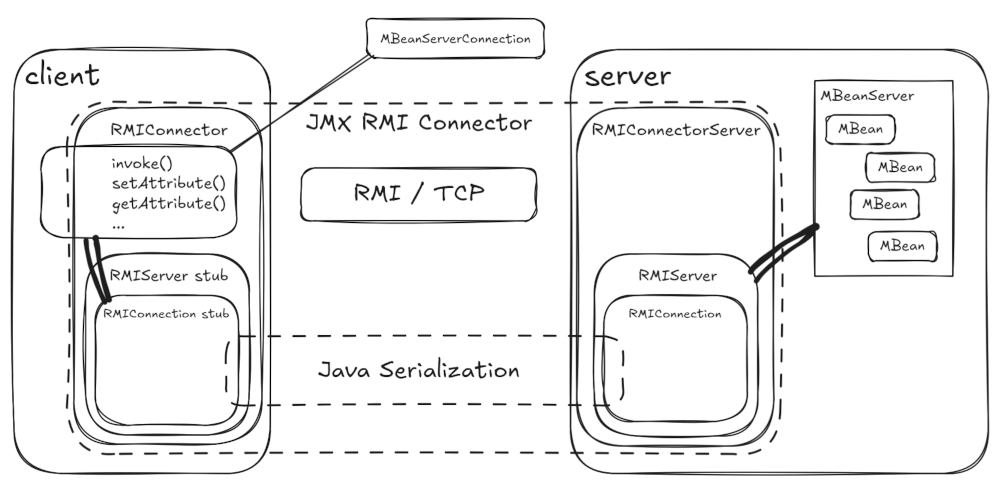
We already know that "JMX Connector" = "JMX Connector Client" + "JMX Connector Server". Each deserves a dedicated section.
JMX Remote RMI Connector Server
When a Java application starts, the platform MBean Server is created automatically as mentioned in How the platform MBeanServer is created?.
According to JMX Remote Specification, a Connector Server attaches to a local MBeanServer. But this doesn’t happen automatically. From user perspective we just need to set some system variables. From the internal perspective, a remote object needs to be exported using RMI.
How to enable remote JMX (using RMI) in Java application?
When the user sets any system property like -Dcom.sun.management, JVM sets the global ManagementServer flag. Then jdk.internal.agent.Agent.startAgent() is called.
-
If
-Dcom.sun.management.jmxremoteis used (no value needed),sun.management.jmxremote.ConnectorBootstrap.startLocalConnectorServer()is called -
If
-Dcom.sun.management.jmxremote.portis set,sun.management.jmxremote.ConnectorBootstrap.startRemoteConnectorServer()and the above is called
That’s it - we now have an application opened for management and we can:
-
locate a remote
javax.management.remote.rmi.RMIServerobject -
call
javax.management.remote.rmi.RMIServer.newClient()to get ajavax.management.remote.rmi.RMIConnection -
use
RMIConnectionto call methods likejavax.management.remote.rmi.RMIConnection.queryMBeans().
See Table 2-1 Ready-to-Use Monitoring and Management Properties for more details about com.sun.management.jmxremote properties.
See more about how the client side of the JMX Connector works in JMX Remote RMI Connector Client.
How the remote JMX over RMI is implemented?
With a single -Dcom.sun.management.jmxremote.port=<tcp-port-number> we end up with:
-
instances of
javax.management.remote.rmi.RMIConnectorServer -
instances of
javax.management.remote.rmi.RMIJRMPServerImpl- the local one will use specialsun.management.jmxremote.LocalRMIServerSocketFactoryaccepting only local connections -
servers in the
javax.management.remote.rmi.RMIConnectorServer.openedServersstatic set
Additionally the local connector server’s address (javax.management.remote.rmi.RMIConnectorServer.getAddress()) is exported to the instrumentation buffer, so this application is available to tools like jconsole. See jdk.internal.perf.Perf for details.
Without Dcom.sun.management.jmxremote properties we can still enable remote JMX using jcmd tool to start remote or local JMX Connector Server:
$ jcmd <pid> help ManagementAgent.start
<pid>:
ManagementAgent.start
Start remote management agent.

Impact: Low: No impact

Syntax : ManagementAgent.start [options]

Options: (options must be specified using the <key> or <key>=<value> syntax)
	config.file : [optional] set com.sun.management.config.file (STRING, no default value)
	jmxremote.host : [optional] set com.sun.management.jmxremote.host (STRING, no default value)
	jmxremote.port : [optional] set com.sun.management.jmxremote.port (STRING, no default value)
	jmxremote.rmi.port : [optional] set com.sun.management.jmxremote.rmi.port (STRING, no default value)
	jmxremote.ssl : [optional] set com.sun.management.jmxremote.ssl (STRING, no default value)
	jmxremote.registry.ssl : [optional] set com.sun.management.jmxremote.registry.ssl (STRING, no default value)
	jmxremote.authenticate : [optional] set com.sun.management.jmxremote.authenticate (STRING, no default value)
	jmxremote.password.file : [optional] set com.sun.management.jmxremote.password.file (STRING, no default value)
	jmxremote.access.file : [optional] set com.sun.management.jmxremote.access.file (STRING, no default value)
	jmxremote.login.config : [optional] set com.sun.management.jmxremote.login.config (STRING, no default value)
	jmxremote.ssl.enabled.cipher.suites : [optional] set com.sun.management.jmxremote.ssl.enabled.cipher.suite (STRING, no default value)
	jmxremote.ssl.enabled.protocols : [optional] set com.sun.management.jmxremote.ssl.enabled.protocols (STRING, no default value)
	jmxremote.ssl.need.client.auth : [optional] set com.sun.management.jmxremote.need.client.auth (STRING, no default value)
	jmxremote.ssl.config.file : [optional] set com.sun.management.jmxremote.ssl.config.file (STRING, no default value)
	jmxremote.autodiscovery : [optional] set com.sun.management.jmxremote.autodiscovery (STRING, no default value)
	jdp.port : [optional] set com.sun.management.jdp.port (INT, no default value)
	jdp.address : [optional] set com.sun.management.jdp.address (STRING, no default value)
	jdp.source_addr : [optional] set com.sun.management.jdp.source_addr (STRING, no default value)
	jdp.ttl : [optional] set com.sun.management.jdp.ttl (INT, no default value)
	jdp.pause : [optional] set com.sun.management.jdp.pause (INT, no default value)
	jdp.name : [optional] set com.sun.management.jdp.name (STRING, no default value)

$ jcmd <pid> help ManagementAgent.start_local
<pid>:
ManagementAgent.start_local
Start local management agent.

Impact: Low: No impact

Syntax: ManagementAgent.start_local
This command invokes jdk.internal.agent.Agent.startLocalManagementAgent directly using JMXStartLocalDCmd::execute native method.
The above behavior is built inside jdk.internal.agent.Agent in jdk.management.agent module. But we can achieve the same result programmatically. For example Apache Karaf is using this approach.
When looking at the server side of Figure 2, “JMX RMI Remote Connector”, we have 3 components:
-
javax.management.remote.rmi.RMIConnectorServerimplementation ofjavax.management.remote.JMXConnectorServer -
javax.management.remote.rmi.RMIJRMPServerImpl(RMI over Java Remote Method Protocol) implementation ofjavax.management.remote.rmi.RMIServer -
javax.management.remote.rmi.RMIConnectionImplimplementation ofjavax.management.remote.rmi.RMIConnection
At lower (only RMI) level, we need to export javax.management.remote.rmi.RMIJRMPServerImpl as a remote object and make its stub available for remote applications.
But there’s a helper method that does exactly that and works with javax.management.remote.JMXServiceURL. This saves us from the low-level RMI details and puts emphasis on what we have called a starting point in Obtaining a connector (client) - the JMX Service URL.
Here’s the static method:
public static JMXConnectorServer newJMXConnectorServer(
    JMXServiceURL serviceURL, Map<String,?> environment, MBeanServer mbeanServer)
        throws IOException {
There are 3 parameters:
-
serviceURLthat describes how we want to make theJMXConnectorServeravailable -
environmentwhich can be used to configure the actual implementation (RMI) - see the source code forjavax.management.remote.rmi.RMIConnectorServerto check the properties which are used -
mbeanServerto which the JMX Connector Server attaches as mentioned in JMX Connectors - an overview.
So finally we can explain JMX Service URL format better - here, from the server (JMXConnectorServerProvider) perspective.
javax.management.remote.JMXServiceURL constructor has 4 arguments: protocol, host, port and a path.
-
JMX Remote Specification defines
rmi(mandatory) andjmxmp(optional) protocols. And because the only available implementation ofjavax.management.remote.JMXConnectorServerProvideriscom.sun.jmx.remote.protocol.rmi.ServerProvider, we have to usermi. This protocol ID is actually a hint for theJMXConnectorServerFactoryto select properJMXConnectorServerProvider.If the protocol is null, it’s assumed to be"jmxmp", so be careful. -
The host is not used when exporting the remote object for
javax.management.remote.rmi.RMIConnectorServer- it’s used to construct anotherJMXServiceURLto be used at client side -
The port is exactly the same port which is passed to the
java.rmi.server.UnicastRemoteObject.exportObject(java.rmi.Remote, int)call for RMI export -
The path must be empty or needs to start with
/jndi/- see below.
Now the service URL format has more details and we have two forms used when exporting a JMX Connector Server.
service:jmx:rmi://<host-of-the-exported-server-connector>:<tcp-port>
service:jmx:rmi://<host-of-the-exported-server-connector>:<tcp-port>/jndi/<registry-url>
Calling javax.management.remote.JMXConnectorServerFactory.newJMXConnectorServer() does a lot of work for us and we won’t repeat how the RMI object is exported. The return value is an RMI based implementation javax.management.remote.rmi.RMIConnectorServer that holds a reference to the javax.management.remote.rmi.RMIServer remote object (already exported). We simply have to call javax.management.remote.JMXConnectorServer.start().
What is interesting is what we get from the javax.management.remote.rmi.RMIConnectorServer.getAddress() - it’s another JMXServiceURL to be used at client side (see JMX Remote RMI Connector Client), but it’s adjusted to just created JMX Connector Server.
In other words, we used one JMXServiceURL as a recipe for creating a JMX Connector Server and got another JMXServiceURL with more information. This additional information is needed for a client to connect to the just created server.
Here’s what we get after creating and starting the RMIConnectorServer without specified path argument:
service:jmx:rmi://localhost:44444/stub/rO0ABXNyAC5qYXZheC5t...
javax.management.remote.rmi.RMIConnectorServer.encodeStub() serializes and base64-encodes the javax.management.remote.rmi.RMIServer stub. We just have to use the URL as is at the client side. The encoded value will be deserialized as javax.management.remote.rmi.RMIServer stub and we can call the remote methods!
What’s more interesting is the recipe JMXServiceURL that contains /jndi/<registry-url> prefixed path.
When JMXConnectorServer contains this path, the stub part of the RMIServer is registered in the directory service.
In Java, directory services are accessed using Java Naming and Directory Interface (JNDI) API.
The easy concept expressed by javax.naming.Context interface is all about binding names to objects. The details may be complex though.
Java provides built-in support for these particular directory services:
-
DNS - Domain Name System (
com.sun.jndi.dns.DnsContext) -
LDAP - Lightweight Directory Access Protocol (
javax.naming.ldap.LdapContext) -
RMI Registry (
com.sun.jndi.rmi.registry.RegistryContext), which delegates to remote objectjava.rmi.registry.Registrydescribed in Obtaining the dynamic stubs - the RMI Registry -
bonus Corba CosNaming (removed after JDK8) (
com.sun.jndi.cosnaming.CNCtx)
Knowing that, we can use full JMX Service URL with two registries that can be used (no one expects stubs to be bound in DNS…).
RMIServer stub in an RMI Registry// create a new or locate an existing RMI Registry
LocateRegistry.createRegistry(Registry.REGISTRY_PORT);
// JMXServiceURL _recipe_ for creating an RMI-based JMXConnectoServer bound to an RMI Registry
JMXServiceURL url = new JMXServiceURL("rmi", "localhost", 44444, "/jndi/rmi://localhost:1099/my-mbean-server");
// Create a JMX Connector Server (the server part of remote JMX Connector) based on RMI, as hinted by "rmi" protocol
// specified in the URL
JMXConnectorServer connectorServer = JMXConnectorServerFactory.newJMXConnectorServer(url, null, ManagementFactory.getPlatformMBeanServer());
// Start the Connector Server which binds the RMIServer in the RMI Registry
connectorServer.start();
// ...
// Locate and use the RMIServer at client side (in another application)
Registry registry = LocateRegistry.getRegistry(1099);
RMIServer rmiServer = (RMIServer) registry.lookup("my-mbean-server");
System.out.println(rmiServer.getVersion());RMI operations (like exporting the remote object) are hidden inside JMXConnectorServerFactory.newJMXConnectorServer() call.
RMIServer stub in an LDAP Registry// JMXServiceURL _recipe_ for creating an RMI-based JMXConnectoServer bound to an LDAP Registry
JMXServiceURL url = new JMXServiceURL("rmi", "localhost", 44444, "/jndi/ldap://localhost:389/cn=my-mbean-server,ou=registry,dc=everfree,dc=forest");
// Create a JMX Connector Server (the server part of remote JMX Connector) based on RMI, as hinted by "rmi" protocol
// specified in the URL. The `environment` parameter is used by JNDI for binding
JMXConnectorServer server = JMXConnectorServerFactory.newJMXConnectorServer(url, Map.of(
"java.naming.security.principal", "cn=admin,dc=everfree,dc=forest",
"java.naming.security.credentials", "s3cr3t"
), ManagementFactory.getPlatformMBeanServer());
// Start the Connector Server which binds the RMIServer in the LDAP Registry
connectorServer.start();We can actually see how the bound stub looks like in LDAP:
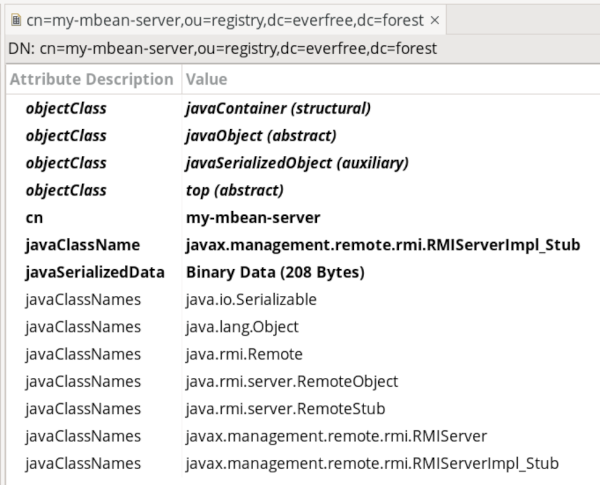
And in LDIF:
dn: cn=my-mbean-server,ou=registry,dc=everfree,dc=forest
objectClass: javaContainer
objectClass: javaObject
objectClass: javaSerializedObject
objectClass: top
cn: my-mbean-server
javaClassName: javax.management.remote.rmi.RMIServerImpl_Stub
javaSerializedData:: rO0ABXNyAC5qYXZheC5tYW5hZ2VtZW50LnJlbW90ZS5ybWkuUk1JU2V
 ydmVySW1wbF9TdHViAAAAAAAAAAICAAB4cgAaamF2YS5ybWkuc2VydmVyLlJlbW90ZVN0dWLp/t
 zJi+FlGgIAAHhyABxqYXZhLnJtaS5zZXJ2ZXIuUmVtb3RlT2JqZWN002G0kQxhMx4DAAB4cHc2A
 ApVbmljYXN0UmVmAA0xOTIuMTY4LjAuMTY1AACtnMQ5QHrCUgBl1xndiwAAAZs1/wzPgAEAeA==
javaClassNames: java.io.Serializable
javaClassNames: java.lang.Object
javaClassNames: java.rmi.Remote
javaClassNames: java.rmi.server.RemoteObject
javaClassNames: java.rmi.server.RemoteStub
javaClassNames: javax.management.remote.rmi.RMIServer
javaClassNames: javax.management.remote.rmi.RMIServerImpl_StubjavaClassName, javaClassNames and javaSerializedData attributes are strictly defined in RFC 2713: Schema for Representing Java™ Objects in an LDAP Directory.
Remember Log4Shell? It was all about forcing an application to fetch an LDAP record containing javaSerializedData and javaCodebase attributes and deserialize the data with catastrophic consequences.The trustSerialData flag is false since 2024, but the trustURLCodebase flag is false since … 2009.
|
The issue with LDAP-bound stubs for remote RMIServer is that it’s really not recommended. An attempt to use such stub should end with:
Caused by: javax.naming.NamingException: Object deserialization is not allowed; remaining name 'cn=my-mbean-server,ou=registry,dc=everfree,dc=forest'
	at java.naming/com.sun.jndi.ldap.Obj.decodeObject(Obj.java:237)
	at java.naming/com.sun.jndi.ldap.LdapCtx.c_lookup(LdapCtx.java:1081)
	at java.naming/com.sun.jndi.toolkit.ctx.ComponentContext.p_lookup(ComponentContext.java:542)
	at java.naming/com.sun.jndi.toolkit.ctx.PartialCompositeContext.lookup(PartialCompositeContext.java:177)
	at java.naming/com.sun.jndi.toolkit.url.GenericURLContext.lookup(GenericURLContext.java:220)
	at java.naming/com.sun.jndi.url.ldap.ldapURLContext.lookup(ldapURLContext.java:94)
	at java.naming/javax.naming.InitialContext.lookup(InitialContext.java:409)
	at java.management.rmi/javax.management.remote.rmi.RMIConnector.findRMIServerJNDI(RMIConnector.java:1839)
	at java.management.rmi/javax.management.remote.rmi.RMIConnector.findRMIServer(RMIConnector.java:1813)
	at java.management.rmi/javax.management.remote.rmi.RMIConnector.connect(RMIConnector.java:302)
	... 2 more
JMX Connector Server summary and relationship with Jolokia
While the entire discussion about the server-side part of the JMX Connectors (in particular the RMI implementation) is not critical to understand what Jolokia is doing, I simply thought it’s nice to have everything in one place.
Actually at the server side, Jolokia is not a JMX Connector at all! JMX Connectors and Protocol Adaptors concepts highlights that Jolokia (Agent) is actually a JMX Protocol Adaptor.
The reason is that Jolokia doesn’t include an implementation of javax.management.remote.JMXConnectorServer and instead it simply provides HTTP/JSON endpoints used to interact with an MBeanServer.
But there’s more for the client side in the following section.
JMX Remote RMI Connector Client
This section is about javax.management.remote.JMXConnector part of the remote JMX Connector. Our goal is to actually get a javax.management.MBeanServerConnection reference to access the remote MBeanServer. From the chapter JMX Connectors defined in the specification we know that we can have an RMI-based JMX Connector Client and Obtaining a connector (client) shows that we start with a recipe JMXServiceURL to get it.
in How the remote JMX over RMI is implemented? we’ve learned about javax.management.remote.JMXConnectorServerFactory.newJMXConnectorServer() factory method. We have the client-side equivalent too.
Obtaining an RMI JMX connector (client)
Here’s an example about how to use a JMXServiceURL recipe and JMXConnectorFactory factory to access a remote MBeanServer
JMXServiceURL url = new JMXServiceURL("rmi", "localhost", 44444, "/jndi/rmi://localhost:1099/my-mbean-server");

JMXConnector connector = JMXConnectorFactory.newJMXConnector(url, new HashMap<>());
connector.connect();

ObjectName name = new ObjectName("com.sun.management:type=DiagnosticCommand");
Object version = connector.getMBeanServerConnection().invoke(name, "vmVersion", new Object[0], new String[0]);
System.out.println("version: " + version);

name = new ObjectName("java.lang:type=Runtime");
Object runtimeName = connector.getMBeanServerConnection().getAttribute(name, "Name");
System.out.println("runtime name: " + runtimeName);

connector.close();
Not much to add. The JMXServiceURL matches the same recipe used at the server side (which creates and exports the server side of the remote JMX Connector). This time the protocol part of the JMXServiceURL is used to locate a javax.management.remote.JMXConnectorProvider by a javax.management.remote.JMXConnectorFactory.
Jolokia provides two implementations of JMXConnectorProvider - org.jolokia.client.jmxadapter.JolokiaJmxConnectionProvider and org.jolokia.kubernetes.client.KubernetesJmxConnectionProvider.
|
There’s however one interesting thing. Actually it is specific to RMI implementation. Noticed that there are two ports in the JMX Service URL? Port 44444 (at localhost) is where the sun.rmi.transport.tcp.TCPEndpoint is accepting the connections for the exported javax.management.remote.rmi.RMIJRMPServerImpl. But this information is already available in the stub retrieved from the RMI registry running at localhost:1099 where the javax.management.remote.rmi.RMIServer is bound under my-mbean-server name!
The full new JMXServiceURL("rmi", "localhost", 44444, "/jndi/rmi://localhost:1099/my-mbean-server").toString() is:
service:jmx:rmi://localhost:44444/jndi/rmi://localhost:1099/my-mbean-server
But we can also use one of these URLs:
JMXServiceURL url1 = new JMXServiceURL("rmi", null, 0, "/jndi/rmi://localhost:1099/my-mbean-server");
JMXServiceURL url2 = new JMXServiceURL("service:jmx:rmi:///jndi/rmi://localhost:1099/my-mbean-server");
Yes - service:jmx:rmi:///jndi/rmi://localhost:1099/my-mbean-server has enough information to locate an RMIServer stub which contains all the information needed to access its remote part. So we don’t need localhost:44444 at all.
JMX Remote Jolokia Connector
Jolokia doesn’t implement entire JMX Connector, only the client-side part of it.
-
org.jolokia.client.jmxadapter.JolokiaJmxConnectorforservice:jmx:jolokia[+http[s]]:JMX Service URLs -
org.jolokia.kubernetes.client.KubernetesJmxConnectorforservice:jmx:kubernetes:JMX Service URLs
See the details in Jolokia JMX Connector Client.